Search This Blog

Thursday, May 15, 2014

Software Engineering Tools

As a computer scientist, software development tools are essential in building products effectively and efficiently. I use many software tools for the work in my education and career. As a computer science student, it is essential  to learn as many software tools possible in order to make deadlines for homework assignments and practice using them for my future career. Software development is about creating products in the most efficient way possible. Tools will help speed up the development process and enhance your abilities.

This semester at San Jose State University, I discovered and used many tools that helped me with my project with Beauty PT, where my group and I implemented an online appointment system for a local downtown beauty salon. In our projected, we built upon an existing website for Beauty PT. We used the Integrated Development Environment, Eclipse, to add new tabs to the menu bar and implement the appointment system, Appointy, to the webpage. 


Another tool I have used for my project with Beauty PT are the Adobe products Photoshop, InDesign, and Dreamweaver. Prior to this project, I have used Photoshop but I was new to InDesign and Dreamweaver. We used Photoshop to create an advertisement for Beauty PT and used InDesign to create a QR code that links customers to a coupon for the ad. We also used Photoshop to create our final expo poster to present our project. My group also used Dreamweaver to design new parts in Beauty PT's website. 


My favorite software development tool is the integrated development environment, Eclipse. I have used Eclipse since my first year in college and I have used it for all my programming projects in school and work. I prefer Eclipse because of its free use and wide variety of features, such as debugging, customization, and plugins. 

My least favorite tools are Chrome's developer tools and Mozilla Firebug. I have used them in the past to look into the parameters that are passed with GET and POST requests for testing purposes. It is tedious to scan through every HTTP request that is made by the client/browser, and there are no other tools that I know of that automate the task of extracting the parameters of the request as well as the response.

In our modern day, software development tools are improving and becoming more diverse. Many developers have focused on creating tools to make the lives of other developers easier. Their tools allow others to create more new and innovative products to revolutionize our technology industry. 

3D Printing


The technology in our modern day society has vastly evolved in the last 100 years. We began with basic computers that could only do mathematical calculations to smartphones and laptops that have a wide variety of uses and features. One of our more recent leaps in technology are 3D Printers.

How it works
The printer uses a digital model to create three-dimensional solid objects can be shaped in any way. It lays down layers of liquid or powder material to build the model that follow cross sections. The cross sections are then joined to create the final shape. Here is a video demonstrating how the printer works:


Uses
3D printers have shown to be more useful than for printing models of toys and objects. Researchers have used 3D printing to create inexpensive and realistic prosthetics and replacement bones. Architects have been able to create 3D models of buildings. On a more controversial note, people have been able to even print functional gun models using a 3D metal printer. Everyday, researchers, scientists, more are finding new ways to use 3D printing to enhance our way of life.


Price
3D Printers have an extremely large range of pricing. Smaller printers that can be used at home can cost around $200 while large printers used for research and science can cost up to $800,000.

One of more inexpensive 3D printers is the Cube 3D, which can be used for small projects and fit right in your home.

 You can find more information about this printer at their website, http://cubify.com/en/Cube.

Sources
Boboltz, Sara. "11 Amazing Ways People Are Using 3D Printers For Good, Not Guns." The Huffington Post. TheHuffingtonPost.com, 15 Nov. 2013. Web. 15 May 2014. <http://www.huffingtonpost.com/2013/11/15/3d-printer-inventions_n_4262091.html>.

3ders Staff. "Price Compare - 3D Printers." 3ders.org. 3ders, n.d. Web. 16 May 2014. <http://www.3ders.org/pricecompare/3dprinters/>.

Beta Testing

The first time I came across the word, "beta test," I was a young teen playing online multiplayer games. This was a common term among those who played online games. Online game developers often release "beta" versions of their game in order to have real players test minor bugs or survey the critical reception before it is released to the public. Beta testing is extremely crucial to the software release life cycle of an online game because it allows developers to simulate game play and predict popularity before the game is released.

Here is an example of a beta testing program from online game developer, Artifex Mundi. Artifex Mundi allows anyone to be a beta tester and sends them newly released games in order to get feedback.


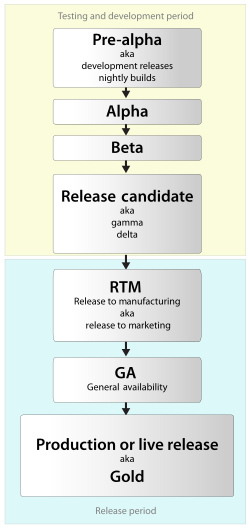
Beta testing is not only important for online games, but for all software releases. It is part of a whole cycle of software release development. In its stage, the software is complete and has already gone through extensive internal testing. However, internal testing cannot cover all cases that may happen in real life usability, so there is still bugs, speed or performance issues, or crashes in the software. Beta versions of software are usually free to download and use until the final version is released.


Beta testing is used to demonstrate or preview software to a prospective customer. This form of testing has advanced software development into the agile, efficient, and error-free system it is today. Beta testing has helped boost small software businesses because it accommodates for the testers that they cannot afford to have.

Sources
Artifex Mundi. Nightmares from the Deep: Davy Jones - Artifex Mundi. N.p., n.d. Web. 15 May 2014. <http://www.artifexmundi.com/>.

Kaspersky Staff. "Kaspersky Beta Testing." Kaspersky Lab. N.p., n.d. Web. 15 May 2014. <http://www.kaspersky.com/downloads/beta_testing>.

Friday, April 18, 2014

Usability Testing

When creating a program or website, often times developers can lose sight of their goals. We can be so caught up in creating more features or making our interface more innovative that we forget our main purpose: to satisfy the users or customers. To avoid this mayhem, we can use a technique called Usability Testing.

Usability testing is an evaluation technique that is user based. It ensures that a product meets its intended purpose, which is to be user-friendly. For instance, a way to test the interface of a car stereo system through usability testing would be to set up a mock version of the stereo system and observe numerous people use the system. Then the developers can see if the users have difficulty using the product and adjust their product to meet the demands of the users.


In software development, it is even easier to execute usability testing. Software is flexible to use, quick to distribute, and easy to observe. Developers can get users all over the world to test their products and control their target market. UserTesting.com is a site that lets you test your software, which includes mobile sites and apps, websites, and Facebook games, and brings the testers to you. 


Testing software is just as essential as creating it, and usability testing is a great way to keep developers on track.

Sources
UserTesting Staff. "How It Works." UserTesting.com. N.p., n.d. Web. 18 Apr. 2014.

Friday, April 11, 2014

Blogs

I began my first blog when I was 15. It was a personal blog that focused on a band that I liked at the time and I used my blog to express my opinions on the band, post digital art and media that I liked or created, discuss with those who made comments on my posts. Even though I knew I wouldn't attract many readers or get a lot of comments, I continued to make posts on my blog. I realize now that my personal blog with my online diary--I used it to express myself but in an anonymous way.

You may wonder, what actually is a blog? A blog is a personal website that someone uses to post their opinions on a regular basis. There are actually many different types of blogs, which vary with the topic or theme that they are posting about.

Here are some common types of blogs:

  • Personal blog: this is the most common type of blog that people use to talk about any personal topics, such as music, politics, family, travel, health, technology, etc.
  • Business blog: professionals can share the opinions, expertise, and skills in their field
  • How-to, tips, and reviews: these are blogs that share their tips and reviews about cooking, films, games, etc.

There are many different websites that host blogs making accounts can be free, quick, fun, and easy. Here are some links to websites with excellent interfaces to create, customize, and post on a blog:


  • www.blogger.com -- you can make multiple blogs on this site that link to your Google account for easy access.


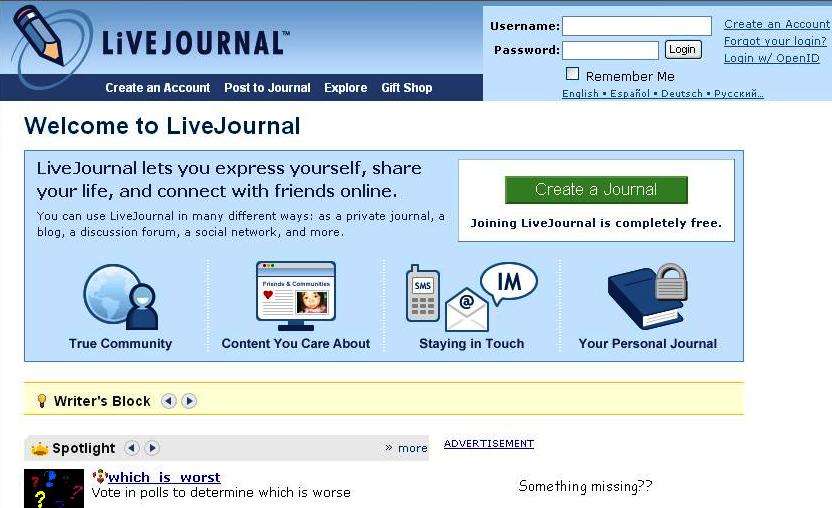
    • www.livejournal.com -- this site offers privacy controls, photo storage, a large amount of customized templates, and more.


      • www.tumblr.com -- this is a combination of a blog and a social networking site. It uses a new form of blogging called microblogging, which limits the styles of posts to make it easier for readers to view. You can also easily make posts through your tablet or mobile phone.

      • In this new era of technology and communication, blogs are essential anonymous self expression and personal growth. Blogs can improve your reading, writing, and communication skills, and attain unbiased opinions from those who comment on your blog. It is important to remember that while blog can be used for personal experiences, it is still on the Internet and widely public. Personal information should be mentioned or distributed discreetly to avoid any major complications. However, I still encourage everyone to have a blog, whether it is about your professional work or your personal hobbies.

        Sources
        Wordpress Staff. "Types of Blogs." WordPress.com. N.p., n.d. Web. 11 Apr. 2014.

        Wednesday, March 26, 2014

        QR Codes

        This week's topic is about QR codes. QR code is short for Quick Response Code, and is used to store data using four standardized encoding modes: numeric, alphanumeric, byte, and kanji. It can be used to track products, identify items, track time, manage documents, and advertise. Many mobile devices now have applications that read QR codes, making QR codes increasingly popular for advertising use. QR codes can store URLs, making it widespread in businesses that want to give details about themselves, give coupons, or share any other types of information.

        Here is a video that shows an example of how QR codes can be used on business cards: 

        For my blog, I have created my own QR code, which is displayed below:


        The easiest way to make QR codes is to go to online site such one of the following listed below:
        ·         www.qrstuff.com
        ·         www.the-qrcode-generator.com
        ·         qrcode.kaywa.com
        ·         goqr.me

        You can also use Adobe InDesign to easily create a QR code. In InDesign, from the menu, select Object > Generate QR Code. You can have the QR code store URLs, text, text messages, emails, or business cards. You can then choose a color and frame for your QR code and QR code will be ready to use. You can print QR codes on your emails, posters, flyers, or business cards to promote your business and bring your marketing into the 21st century.

        Sources:
        Lyne, Marc. "What Is A QR Code And Why Do You Need One?" Search Engine Land. N.p., 15 Oct. 2009. Web. 26 Mar. 2014. <http://searchengineland.com/what-is-a-qr-code-and-why-do-you-need-one-27588>.
        "Generate QR Codes | CC." InDesign Help. Adobe, n.d. Web. 26 Mar. 2014. <http://helpx.adobe.com/indesign/using/generate-qr-code.html>.

        Wednesday, March 12, 2014

        Cyber Security


        Growing up in a generation that is blessed with having the Internet, I was taught to be extremely cautious when downloading files, entering and sending personal information, and installing software. Of course, the lessons I have learned when using online technology were based on many mistakes made in the past. Clicking on seemingly harmless advertisements, downloading "free" movies or videos, and installing suspicious software has led me to download viruses that cause my system to crash or malfunction. We all know that these viruses lead to infinite headaches and frustration, and at a young age, I learned the safety precautions that prevent me from experiencing that frustration again. 

        To protect ourselves when using the Internet, we must become knowledgeable in Cyber security. Cyber security is information protection for computers and networks. Cyber security is essential, especially in our generation which relies heavily on computers and trusts it with our personal information. While new technology has made communication and work life much easier and assessable, such as allowing us to keep track of banking and pay bills online, it has made the public more sustainable to be victims of fraud or identity theft. This is why it is important that cyber security is taken seriously and created reliably to protect the greater public.

        The United States has created an organization called the Computer Emergency Readiness Team (CERT) to help battle common cyber-attacks and to educate the public about cyber security. On their website, they have a list of tips for common, non-technical users to follow to protect their interests. For example, CERT discusses some common terms to be familiar with when it comes to online security:
        • Hacker, attacker, or intruder – these are people that use software to attack people’s computer weaknesses for their own gain.
        • Malicious code – this is also known as malware, and code that infects your computer.
        • Vulnerability – when attackers take advantage of errors in your software.
        There are many reliable and distinguished software programs that can help protect your computer from malicious content. Here is an example:

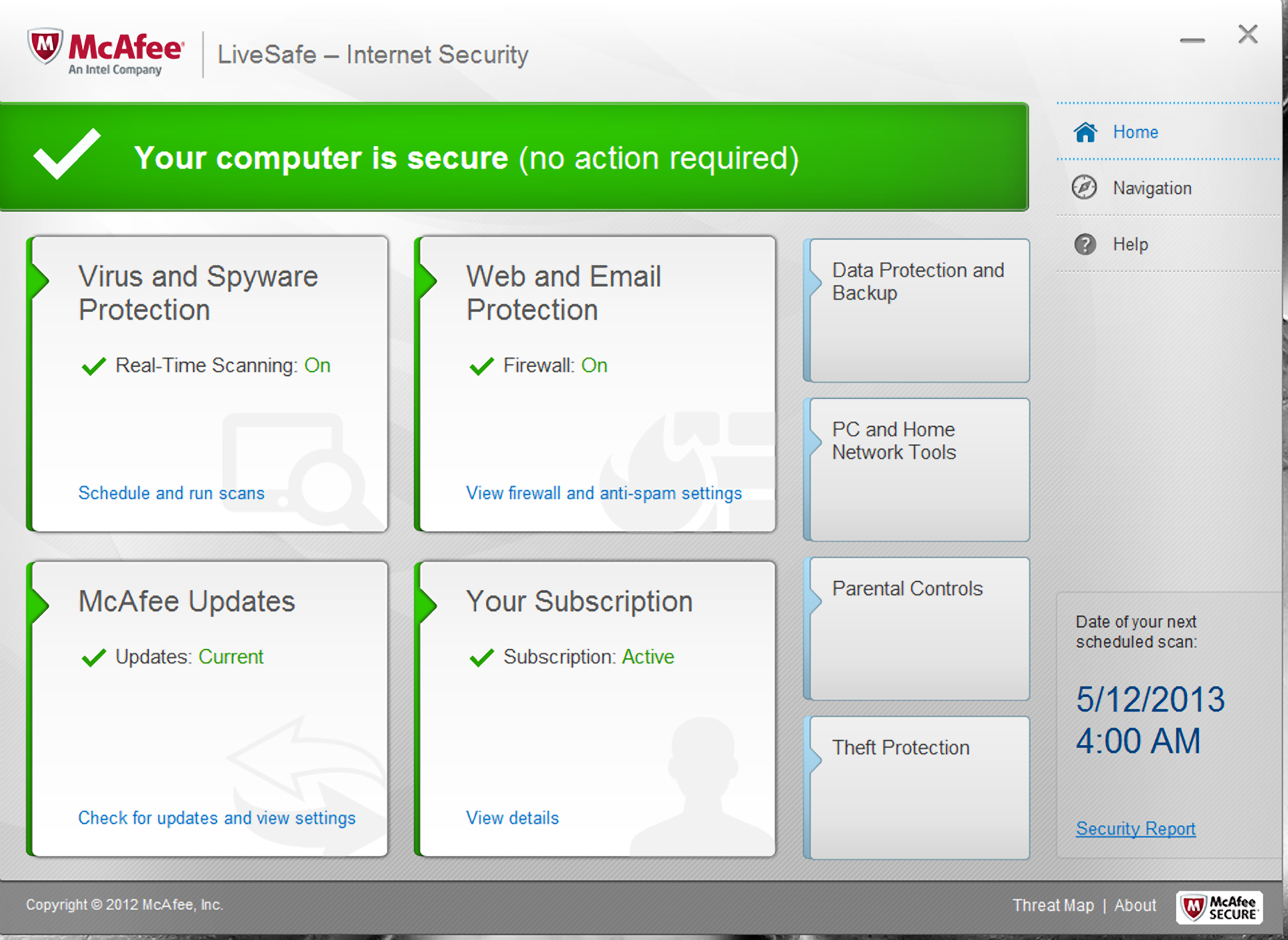
        McAfee is one of the largest security technology companies in the world. For personal use, McAfee's products McAfee LiveSafe and McAfee All Access protects your data and identity on your devices. These products can be extremely useful to those who have limited computer literacy.

         A example of the McAfee LiveSafe software.

        Once again, it is always important to protect your information and become knowledgeable in new technology. Many people underestimate how public the Internet really is and it is always essential to be aware of your surroundings—even if it is not physical.


        Sources:

        McDowell, Mindi, and Allen Householder. "Why Is Cyber Security a Problem?" US-CERT. US Department of Homeland Security, 6 May 2009. Web. 12 Mar. 2014. <https://www.us-cert.gov/ncas/tips/ST04-001>.

        Tuesday, March 4, 2014

        Open Source


        Most of the software products that I use, whether it is for school or for personal use, have been open source. Some of this software includes Android, Firefox, Open Office, and VLC Media Player, which I recommend everyone to use. Open source is a modern and efficient ideology that allows developers to create and improve their work.

        Open source can be either free access to a product’s design or free distribution of that design. Open source products can be improved by anyone. Our modern day society is now abundant with open source software products. Open source encourages people to use a product and change it to fit their needs. People like open source software because they can control the software they use, it benefits them as programmers, and it can be updated and fixed quickly.

        The open source software that I like best and I feel is most beneficial is Git. Git is an open source version control system that allows people to share and exchange projects. It is free software and has a repository that shows complete history and tracking capabilities. Personally, I use Git for projects for work and school and I find it is a professional and organized way of sharing projects with others. It helps with team work and is quick, reliable, and hassle-free. Many companies use Git because of its free usage and I feel that students should practice using it in their school projects so that they are prepared to use it when they enter the high-tech industry.


        You can download Git and access Git’s source code through their website, http://git-scm.com/. 


        Monday, February 24, 2014

        About Me

        About Me


        I am Dora Do, a young female junior engineer who is starting to break into the high tech world. I will be graduating in May 2015 with a degree in Computer Science. I have held two internship positions in high tech companies for at least two years each. I am looking to make use of my skills, knowledge, and experience from my education and past employments and to grow and contribute as a software engineer in the Silicon Valley.

        Work Experience


        For the last two summers, I have interned at B & C Transit. There, I helped to create software using Vital Boolean Logic to control railway lights, traffic, and crossings. I maintained deployment of software, for instance, when software is sent to be tested and there are problems, then it will be sent back and I will make changes to the software. I ran tests on newly built software to assure that safety procedures were followed. I also documented software and design layout changes.
        For the last few summers, I also interned at Strongvon where I aided in creating customer websites and the membership website using HTML, CSS, and Javascript. More recently, I began writing JUnit tests to test the server business logic using Selenium. For example, after a user selects inputs on a registration form, such as adding clothing or coupon codes on top of registration fees, I would write JUnit tests to assure that the shopping cart total will update correctly. 

        Skills and Tools


        The programming language I am most experienced with is Java. In addition, I am also familiar with C, HTML, CSS, Javascript, PHP, and SQL. I am experienced with IDE’s such as Eclipse and Netbeans. I am confident in using Microsoft Office and Adobe Creative Suite programs. I also use both Windows and Linux operating systems.
        Education
        Currently, I am a student at San Jose State University and I am finishing up my degree in Computer Science. My expected graduation date will be in May 2015.

        Projects


        A project I have done in a group assignment is a Mancala game. This project is a version of the Mancala game with a graphical interface. We used objected-oriented design patterns, such as the MVC pattern, the Strategy pattern, and others, to create the program. I implemented the Strategy pattern to allow the game to have multiple graphic themes. Our game ran successfully without errors. 

        Goals


        My goal for the next year is to graduate from my university with a 3.5 GPA and to settle into a position in a technological company in the Silicon Valley as a junior software engineer. From there, my goal for the next five years is to gain experience in the technology industry and strengthen my programming and team work skills.

        Contact Information


        You can contact me at my email address, dora.thien.do@gmail.com